

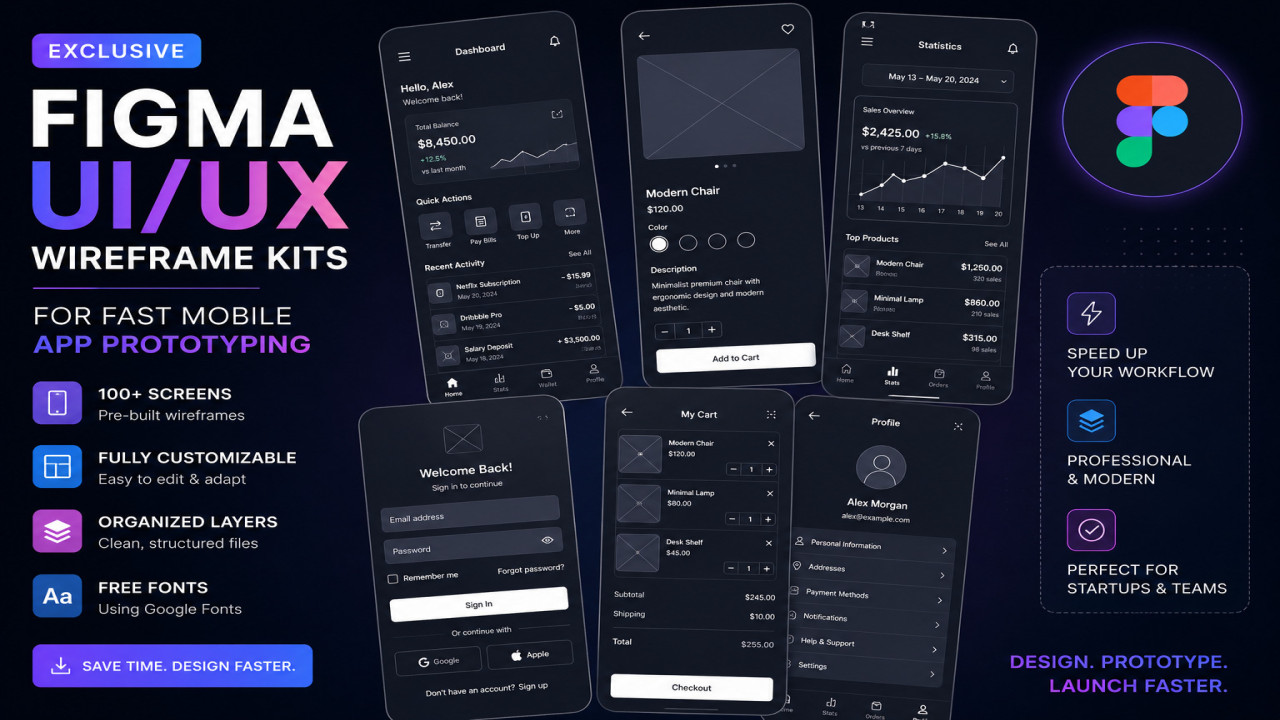
Exclusive Figma UI/UX Wireframe Kits for Fast Mobile App Prototyping
A startup founder sat across from a UI designer with excitement and urgency. The mobile app idea was solid, investors were interested, and development resources were ready. Yet one problem slowed everything down—there was no clear product structure. Every screen discussion turned into revisions, every meeting produced conflicting ideas, and the timeline kept expanding.
This scenario is common in modern app development. Teams often rush toward high-fidelity design or coding without validating user flows and interface structure first. That is where Figma UI/UX wireframe kits become a powerful strategic tool.
Fast mobile app prototyping is no longer optional. Whether you are a freelance designer, startup founder, UX researcher, or SaaS entrepreneur, wireframe kits allow you to transform raw ideas into structured digital experiences within hours instead of weeks.
This guide explores exclusive Figma wireframe kits, how they accelerate mobile UI/UX workflows, and how professionals use them to prototype smarter and launch faster.
What Are Figma UI/UX Wireframe Kits?
Figma wireframe kits are pre-designed collections of interface components used to create mobile application prototypes quickly. These kits typically include:
- Navigation layouts
- Login screens
- Profile pages
- Dashboard components
- Buttons and forms
- Mobile gestures and interactions
- User flow structures
Instead of designing every screen from scratch, designers use reusable components to speed up ideation and
Why Fast Mobile App Prototyping Matters
Speed in product design does not mean sacrificing quality. It means validating ideas earlier and reducing expensive mistakes during development.
Wireframe kits support:
- Rapid MVP planning
- Faster stakeholder approval
- Improved collaboration
- Reduced development rework
- Clear UX structure before coding
For startups and freelancers, this efficiency can save both time and budget.
Key Features of Premium Figma Wireframe Kits
Reusable Components
Component libraries ensure consistent design patterns across multiple screens and devices.
Auto Layout Support
Modern Figma kits rely heavily on Auto Layout, allowing responsive resizing and faster editing.
Design System Integration
Professional wireframe kits are often compatible with scalable design systems.
Interactive Prototyping
Clickable flows help teams test navigation and usability before development begins.
Comparison Table: Figma Wireframe Kit Types
| Type | Price | Features | Advantages | Disadvantages | Compatibility |
|---|---|---|---|---|---|
| Basic Free Kits | Free | Simple screens and layouts | Beginner-friendly | Limited flexibility | Personal projects |
| Exclusive Wireframe Kits | Free/Premium | Advanced UI systems | Fast workflows | Learning curve | Freelancers & startups |
| Enterprise Design Systems | Paid | Full scalable frameworks | Highly structured | Higher cost | Large teams |
Step-by-Step Guide: Using Figma Wireframe Kits
- Install the Kit
Import the Figma file or duplicate it into your workspace. - Define User Flow
Identify the app journey before placing screens. - Customize Components
Edit typography, layout spacing, and content hierarchy. - Create Screen Relationships
Connect screens using prototype interactions. - Run Early Testing
Share prototypes with users or stakeholders for validation. - Iterate Rapidly
Use feedback to improve navigation and usability.

Symptoms of Poor Mobile Prototyping
Many teams underestimate the consequences of weak wireframing.
- Confusing navigation
- Frequent redesign requests
- Unclear product scope
- Slow design cycles
- Developer misunderstandings
- Inconsistent UI structure
Common Causes Behind Slow UX Workflows
- Starting from blank canvases
- No reusable component system
- Weak collaboration process
- Poor design documentation
- Skipping user flow planning
Solutions Through Exclusive Figma Kits
Exclusive Figma wireframe kits address workflow bottlenecks by introducing speed, structure, and consistency.
- Standardized layouts
- Reusable interaction patterns
- Collaborative editing
- Fast iteration cycles
- Scalable design frameworks
These systems reduce uncertainty and allow teams to focus on solving UX problems instead of rebuilding interfaces repeatedly.
Common Mistakes Designers Make
- Jumping directly into visual design
- Ignoring user journey mapping
- Overcomplicating layouts
- Using inconsistent spacing systems
- Building without feedback cycles
A wireframe should simplify decisions, not introduce unnecessary complexity.
Real-World Example
A fintech startup reduced prototype delivery time from three weeks to five days after switching to reusable Figma wireframe kits. Instead of debating layout structure in meetings, the team focused on user behavior and conversion flow optimization.
The result was faster approval and fewer development revisions.
💡 Expert Tip
Professional designers rarely begin with polished interfaces. They begin with structure. Use wireframe kits to validate logic and user flow first, then move toward visual identity and branding.
Advanced Workflow Optimization
Experienced UI/UX teams often integrate Figma wireframe kits with:
- Design systems
- User testing tools
- Developer handoff workflows
- Agile product management systems
- Accessibility validation processes
This creates a streamlined pipeline from ideation to production.
Frequently Asked Questions (FAQ)
Q: Are Figma wireframe kits suitable for beginners?
Yes. Most kits are easy to customize and significantly reduce design complexity.
Q: Can wireframe kits replace full UI design?
No. Wireframes focus on structure and user flow before final visual styling.
Q: Are free Figma kits enough?
For many freelancers and startups, free or exclusive kits are often sufficient for MVP design.
Q: Can developers use these prototypes?
Yes. Interactive wireframes improve communication and developer handoff.
Final Thoughts
Fast mobile app prototyping is not about rushing design—it is about making smarter decisions earlier. Exclusive Figma UI/UX wireframe kits provide the structure and efficiency needed to transform ideas into validated digital experiences.
Whether you build SaaS products, mobile startups, or freelance client projects, investing time in wireframe systems creates smoother workflows and stronger products.






Comments (0)
No comments found