

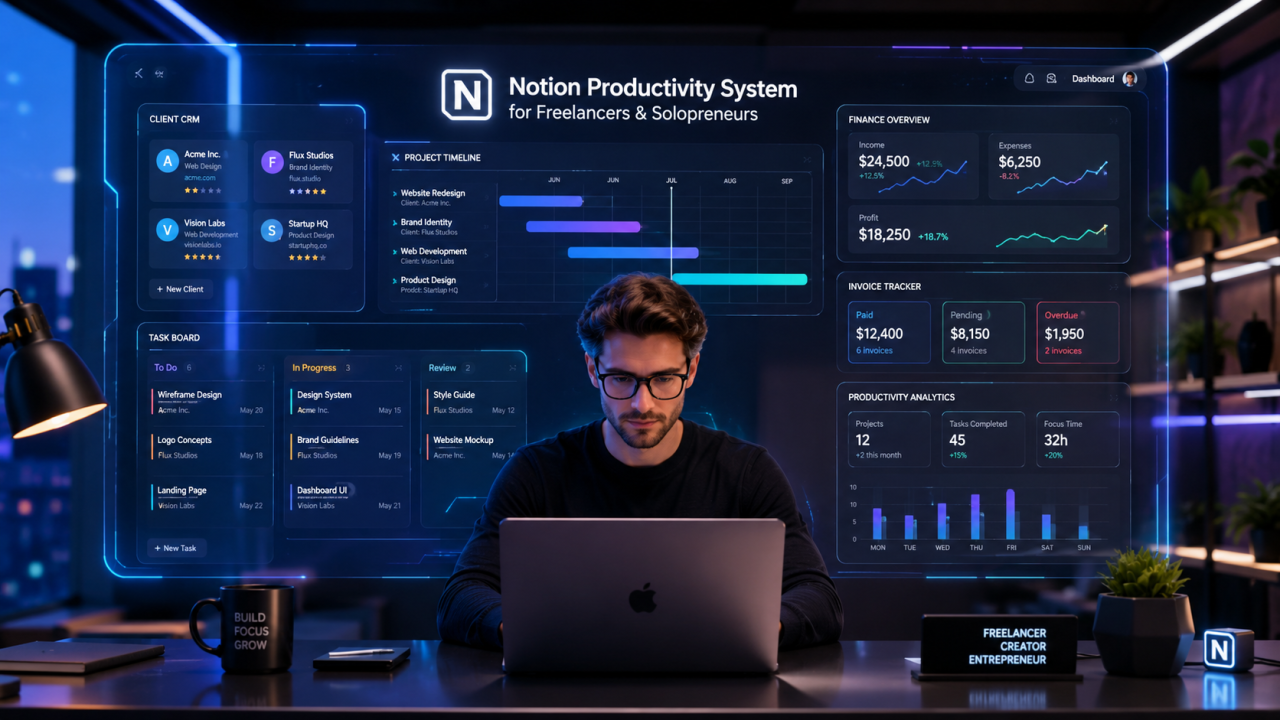
Free Notion Templates Pack for Freelancers & Solopreneurs
It usually starts the same way. A freelancer opens Notion with good intentions—maybe to organize clients, track invoices, or finally build a “proper system.” Within an hour, the workspace turns into a maze of empty pages, half-finished dashboards, and templates that looked perfect on YouTube but never quite fit real work.
For solopreneurs and tech freelancers, the problem is rarely lack of tools. It’s the fragmentation of systems: tasks in one app, notes in another, clients in spreadsheets, and deadlines somewhere in email threads. The result is not just inefficiency—it’s mental fatigue.
This article introduces a structured, practical, and completely free Notion templates pack designed specifically for tech freelancers and solopreneurs who want to run their entire business from a single, scalable system.
Why Freelancers Struggle Without a System
Before jumping into templates, it’s important to understand the underlying issue. Most freelancers don’t fail due to lack of skill—they fail due to lack of operational structure.
- No centralized client database
- No clear project lifecycle tracking
- Scattered task management systems
- Weak financial visibility
- Inconsistent productivity routines
Notion solves this—but only if it is implemented as a system, not a collection of random pages.
Overview of the Free Notion Templates Pack
This templates pack is designed as a complete operating system for freelancers. Instead of isolated tools, everything connects:
- Client Management Hub
- Project Workflow System
- Task Automation Dashboard
- Invoice & Finance Tracker
- Content & Marketing Planner
- Daily Productivity System
Each module is interconnected using relational databases inside Notion, allowing real-time updates across your entire workflow.
Core Templates Breakdown
1. Client CRM System
A structured CRM tailored for freelancers managing multiple clients. Unlike traditional CRMs, this one is lightweight and optimized for solo operators.
- Client profiles with contact details
- Project history tracking
- Payment status overview
- Communication logs
2. Project Management Dashboard
This system breaks down every project into stages: Planning, Execution, Review, and Delivery.
- Kanban board integration
- Deadline automation
- Progress tracking
3. Task Execution System
Designed for deep work optimization, this template prioritizes tasks based on urgency and impact.
- Daily task filtering
- Priority tagging system
- Time-blocking integration
Comparison Table: Notion Freelancer Systems
| Type | Price | Features | Advantages | Disadvantages | Compatibility |
|---|---|---|---|---|---|
| Basic Templates | Free | Tasks, notes | Easy to use | Limited scalability | Individual use |
| Advanced Freelancer System | Free | CRM, projects, finance | Fully integrated workflow | Requires setup time | Freelancers & solopreneurs |
| Premium Notion Systems | Paid | Automation, dashboards | Highly optimized | Costly | Teams & agencies |
Step-by-Step Setup Guide
- Duplicate the Notion template pack into your workspace
- Customize client database properties
- Connect projects to clients using relational fields
- Set up task priorities and tags
- Configure dashboard views (Kanban, Table, Calendar)
- Import existing client data
- Begin daily workflow tracking
Symptoms of a Broken Freelance System
- Missed deadlines despite working long hours
- Confusion about active projects
- Lost client information
- Irregular income tracking
- Constant context switching
Causes Behind the Chaos
- Using too many disconnected tools
- No centralized data structure
- Lack of automation in workflows
- Absence of prioritization system
Solutions with Notion System Design
The solution is not working harder—it is building a system where work organizes itself. Notion enables this through relational databases and modular dashboards.
- Centralize all client data
- Automate task linking
- Use templates for repeatable workflows
- Track financials in real time
Common Mistakes Freelancers Make in Notion
- Overbuilding complex dashboards
- Ignoring relational databases
- Not updating systems regularly
- Copying templates without customization
💡 Expert Tip
The most effective Notion setups are not the most complex ones. The real power comes from consistency. A simple system used daily will always outperform a complex system used occasionally.
Frequently Asked Questions (FAQ)
Q: Is Notion enough to run a freelance business?
Yes, if structured properly with databases and workflows.
Q: Do I need paid Notion templates?
No. A well-designed free system is often more than enough.
Q: Can I use this system for agency work?
Yes, but it may need scaling with team permissions.
Final Thoughts
A freelancer without a system is constantly reacting. A freelancer with a structured Notion workspace operates strategically. This templates pack is designed to shift you from chaos to clarity, from scattered execution to controlled growth.
The real advantage is not the templates themselves-it is the discipline they enable.



Comments (0)
No comments found